Real-Time Page User Profile
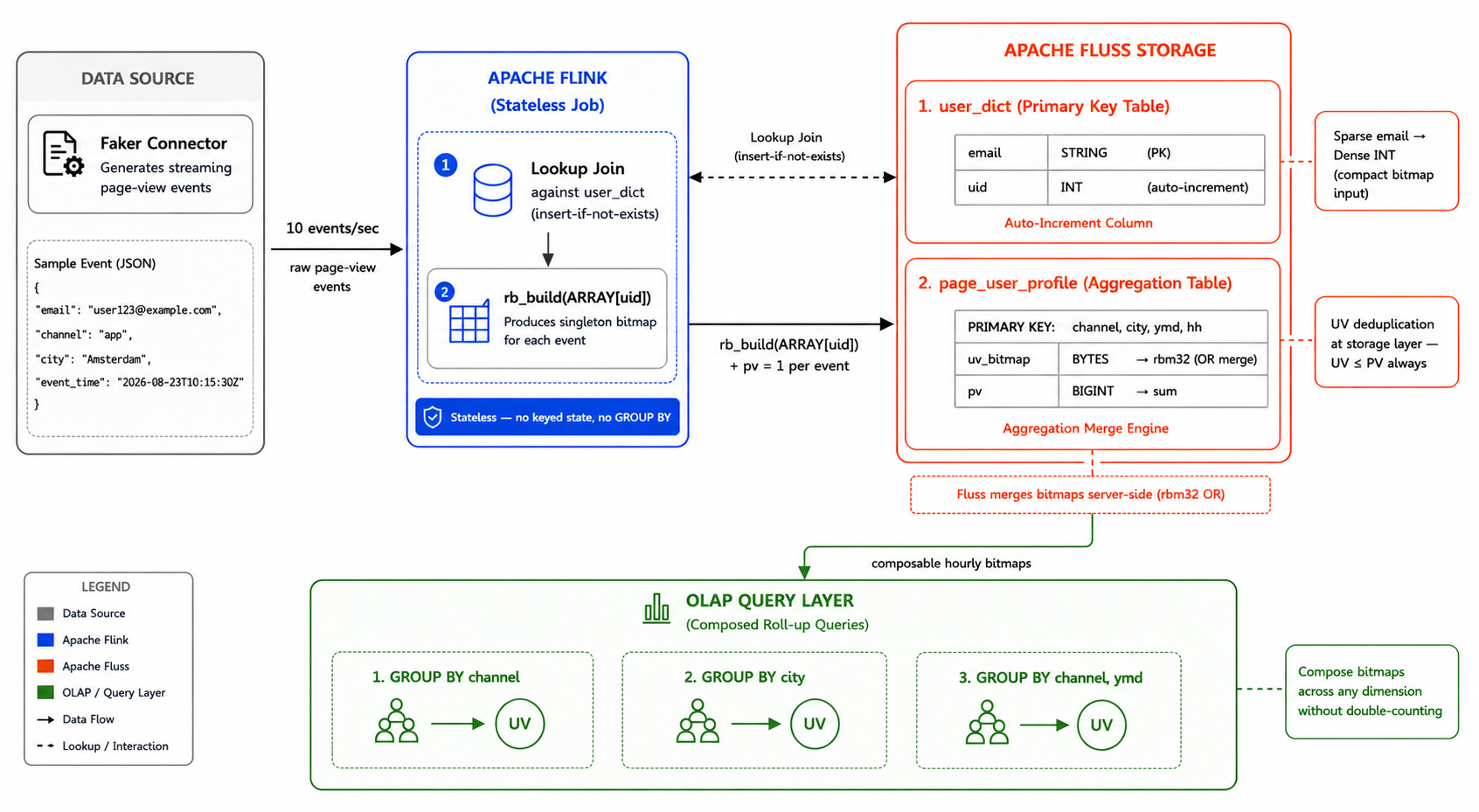
This tutorial demonstrates how to build a real-time page-view analytics system using three core Apache Fluss features: the Auto-Increment Column, the Aggregation Merge Engine, and the built-in RoaringBitmap SQL functions. You will learn how to map high-cardinality email identifiers to compact integer UIDs and accumulate per-dimension page-view (PV) counts and unique visitor (UV) bitmaps directly in the storage layer — keeping the Flink job entirely stateless.
How the System Works
Core Concepts
- Identity Mapping: Incoming email strings are automatically mapped to compact
INTUIDs using Fluss's auto-increment column — no manual ID management required. - Storage-Level Aggregation: PV counts are summed and UV bitmaps are OR-ed directly inside the Fluss TabletServers via the Aggregation Merge Engine, with no aggregation state in Flink.
- Composable Bitmaps: Storing hourly RoaringBitmaps per dimension allows the OLAP layer to compose them across arbitrary dimensions and time ranges without double-counting users.
- Built-in Bitmap Functions:
rb_build,rb_or_agg, andrb_cardinalityare registered natively in FlussCatalog — no external JAR orCREATE TEMPORARY FUNCTIONrequired.
Data Flow
- Ingestion: Raw page-view events arrive with an email address, channel, city, and timestamp.
- Mapping: A Flink lookup join against
user_dictresolves the email to a UID. If the email is new, theinsert-if-not-existshint instructs Fluss to generate a new UID automatically. - Aggregation: For each event,
rb_build(ARRAY[d.uid])emits a singleton bitmap and a PV increment of 1. The Aggregation Merge Engine OR-s the bitmaps and sums the PV counts per(channel, city, ymd, hh)bucket at the storage layer — no windowing or Flink state required. - Roll-up: OLAP queries use
rb_or_aggto union the stored hourly bitmaps across arbitrary dimensions, producing accurate UV counts without double-counting.
Prerequisites
Before proceeding, ensure that Docker and the Docker Compose plugin are installed on your machine.
Environment Setup
-
Create a working directory and navigate into it.
mkdir fluss-page-user-profilecd fluss-page-user-profile -
Create a
docker-compose.ymlfile with the following content:services:coordinator-server:image: apache/fluss:1.1-SNAPSHOTcommand: coordinatorServerdepends_on:- zookeeperenvironment:- |FLUSS_PROPERTIES=zookeeper.address: zookeeper:2181bind.listeners: FLUSS://coordinator-server:9123remote.data.dir: /tmp/fluss/remotevolumes:- fluss-remote-data:/tmp/fluss/remotetablet-server:image: apache/fluss:1.1-SNAPSHOTcommand: tabletServerdepends_on:- coordinator-serverenvironment:- |FLUSS_PROPERTIES=zookeeper.address: zookeeper:2181bind.listeners: FLUSS://tablet-server:9123data.dir: /tmp/fluss/dataremote.data.dir: /tmp/fluss/remotevolumes:- fluss-remote-data:/tmp/fluss/remotezookeeper:restart: alwaysimage: zookeeper:3.9.2jobmanager:image: apache/fluss-quickstart-flink:1.20-1.1-SNAPSHOTports:- "8083:8081"command: jobmanagerenvironment:- |FLINK_PROPERTIES=jobmanager.rpc.address: jobmanagerrest.address: jobmanagerrest.port: 8081volumes:- fluss-remote-data:/tmp/fluss/remotetaskmanager:image: apache/fluss-quickstart-flink:1.20-1.1-SNAPSHOTdepends_on:- jobmanagercommand: taskmanagerenvironment:- |FLINK_PROPERTIES=jobmanager.rpc.address: jobmanagertaskmanager.numberOfTaskSlots: 2volumes:- fluss-remote-data:/tmp/fluss/remotesql-client:image: apache/fluss-quickstart-flink:1.20-1.1-SNAPSHOTcommand: ["/opt/flink/bin/sql-client.sh"]depends_on:- jobmanagerenvironment:- |FLINK_PROPERTIES=jobmanager.rpc.address: jobmanagerrest.address: jobmanagerrest.port: 8081volumes:- fluss-remote-data:/tmp/fluss/remotevolumes:fluss-remote-data: -
Start all services.
docker compose up -d -
Count the long-running containers (the interactive
sql-clientservice is excluded).docker compose ps --status running --quiet \coordinator-server tablet-server zookeeper jobmanager taskmanager | wc -lThe expected output is
5. A lower number means that one or more containers failed to start. Rundocker compose ps -ato identify them. Thesql-clientservice may exit because no interactive terminal is attached; this is expected because a new SQL client container is started later withdocker compose run sql-client.
All the following commands involving docker compose should be executed in the working directory that contains the docker-compose.yml file.
Enter the SQL Client
Use the following command to enter the Flink SQL Client:
docker compose run sql-client
Create the Fluss Catalog
Run these statements one by one in the SQL Client.
Run SQL statements one by one to avoid errors.
CREATE CATALOG fluss_catalog WITH (
    'type' = 'fluss',
    'bootstrap.servers' = 'coordinator-server:9123'
);
USE CATALOG fluss_catalog;
Once you switch to the Fluss catalog, all RoaringBitmap SQL functions (rb_build, rb_or_agg, rb_cardinality, and others) are available immediately — no CREATE TEMPORARY FUNCTION statement is needed.
Create the User Dictionary Table
Create the user_dict table to map email addresses to integer UIDs. The auto-increment.fields property instructs Fluss to automatically assign a unique INT UID for every new email it receives.
CREATE TABLE user_dict (
    email STRING,
    uid   INT,
    PRIMARY KEY (email) NOT ENFORCED
) WITH (
    'auto-increment.fields' = 'uid'
);
Create the Page User Profile Table
Create the page_user_profile table using the Aggregation Merge Engine. The primary key represents the business dimensions and time bucket — (channel, city, ymd, hh). The uid is only the visitor identifier stored in the bitmap, not the table key. Each row accumulates a UV bitmap and a PV counter directly at the storage layer.
CREATE TABLE page_user_profile (
    channel   STRING,
    city      STRING,
    ymd       STRING,
    hh        STRING,
    uv_bitmap BYTES,
    pv        BIGINT,
    PRIMARY KEY (channel, city, ymd, hh) NOT ENFORCED
) WITH (
    'table.merge-engine'   = 'aggregation',
    'fields.uv_bitmap.agg' = 'rbm32',
    'fields.pv.agg'        = 'sum'
);
uv_bitmap stores a RoaringBitmap of all visitor UIDs for each (channel, city, ymd, hh) bucket. Fluss OR-s each incoming singleton bitmap into the stored one, ensuring that a user appearing multiple times in the same bucket is counted only once.
Ingest and Process Data
Create a temporary source table to simulate page-view events using the Faker connector. The source generates a bounded pool of user email addresses distributed across 3 channels, 3 cities, and the most recent 36 hours at 10 events per second.
CREATE TEMPORARY TABLE page_views (
    email      STRING,
    channel    STRING,
    city       STRING,
    event_time TIMESTAMP(3),
    ymd AS DATE_FORMAT(event_time, 'yyyyMMdd'),
    hh  AS DATE_FORMAT(event_time, 'HH'),
    proctime AS PROCTIME()
) WITH (
    'connector'                    = 'faker',
    'rows-per-second'              = '10',
    'fields.email.expression'      =
        'user#{number.numberBetween ''1'',''500''}@example.com',
    'fields.channel.expression'    =
        '#{Options.option ''app'',''web'',''mini_program''}',
    'fields.city.expression'       =
        '#{Options.option ''Amsterdam'',''Berlin'',''New York''}',
    'fields.event_time.expression' =
        '#{date.past ''36'',''HOURS''}'
);
Now run the pipeline. For each page-view event, rb_build(ARRAY[d.uid]) creates a singleton bitmap containing just that visitor's UID. Fluss OR-s it into the stored bitmap for the matching (channel, city, ymd, hh) bucket, while summing the PV count — all at the storage layer with no Flink state.
INSERT INTO page_user_profile
SELECT
    e.channel,
    e.city,
    e.ymd,
    e.hh,
    rb_build(ARRAY[d.uid]) AS uv_bitmap,
    CAST(1 AS BIGINT)      AS pv
FROM page_views AS e
JOIN user_dict
/*+ OPTIONS('lookup.insert-if-not-exists' = 'true') */
FOR SYSTEM_TIME AS OF e.proctime AS d
ON e.email = d.email;
Verify Results
After the pipeline is submitted, the prompt returns immediately since Flink DML is asynchronous by default. Switch to batch mode to run the roll-up queries — rb_or_agg operates on the pre-aggregated bitmaps stored in Fluss and does not support streaming retraction.
SET 'execution.runtime-mode' = 'batch';
SET 'sql-client.execution.result-mode' = 'tableau';
Roll up UV and PV by channel across all cities, dates, and hours:
SELECT
    channel,
    rb_cardinality(rb_or_agg(uv_bitmap)) AS uv,
    SUM(pv)                               AS pv
FROM page_user_profile
GROUP BY channel;
Output:
+--------------+-----+------+
|      channel |  uv |   pv |
+--------------+-----+------+
|          app | 357 |  712 |
| mini_program | 352 |  698 |
|          web | 351 |  704 |
+--------------+-----+------+
3 rows in set
Notice that UV is always less than PV — users repeat across time buckets, and Fluss correctly deduplicates them via bitmap union.
Roll up UV and PV by city:
SELECT
    city,
    rb_cardinality(rb_or_agg(uv_bitmap)) AS uv,
    SUM(pv)                               AS pv
FROM page_user_profile
GROUP BY city;
Output:
+-----------+-----+------+
|      city |  uv |   pv |
+-----------+-----+------+
| Amsterdam | 460 |  913 |
|    Berlin | 417 |  819 |
|  New York | 403 |  782 |
+-----------+-----+------+
3 rows in set
Daily roll-up by channel:
SELECT
    channel,
    ymd,
    rb_cardinality(rb_or_agg(uv_bitmap)) AS uv,
    SUM(pv)                               AS pv
FROM page_user_profile
GROUP BY channel, ymd;
Output:
+--------------+----------+-----+-----+
|      channel |      ymd |  uv |  pv |
+--------------+----------+-----+-----+
|          app | 20260821 |  59 |  78 |
|          app | 20260822 | 348 | 580 |
|          app | 20260823 | 115 | 152 |
| mini_program | 20260821 |  45 |  63 |
| mini_program | 20260822 | 321 | 547 |
| mini_program | 20260823 | 138 | 179 |
|          web | 20260821 |  48 |  65 |
|          web | 20260822 | 337 | 561 |
|          web | 20260823 | 109 | 148 |
+--------------+----------+-----+-----+
9 rows in set
The key insight: a user who visits the app channel on multiple days is counted once per day in the daily roll-up, and once overall in the channel roll-up. Bitmaps compose correctly without double-counting across any dimension combination.
To verify the email-to-UID dictionary mapping:
SELECT * FROM user_dict LIMIT 10;
Output:
+---------------------+------+
|               email |  uid |
+---------------------+------+
|  user77@example.com | 1740 |
|   user1@example.com |  927 |
|   user9@example.com |  912 |
|   user3@example.com | 1525 |
| user201@example.com |   89 |
|  user15@example.com | 1371 |
| user302@example.com | 1657 |
|  user12@example.com |  234 |
|  user45@example.com |  891 |
|  user78@example.com | 1102 |
+---------------------+------+
10 rows in set
Each email has a unique compact INT UID automatically assigned by Fluss.
Clean Up
Exit the SQL Client by typing exit;, then stop all services.
docker compose down -v
Architectural Benefits
- Stateless Flink Jobs: Fluss handles all bitmap unions and PV sums at the storage layer. The Flink job is responsible only for identity mapping and event forwarding — no GROUP BY, no windowed aggregation, no Flink state.
- Composable Bitmaps: Storing hourly RoaringBitmaps per dimension allows arbitrary roll-ups across channels, cities, dates, or any combination — without double-counting users.
- Compact Storage: Using auto-incremented
INTUIDs instead of raw email strings keeps bitmap sizes small even at large user populations. - Exact Unique Counting: RoaringBitmap provides exact distinct counts — no approximations like HyperLogLog.
- Exactly-Once Accuracy: The Undo Recovery mechanism in the Fluss Flink connector ensures replayed data during failovers does not result in double-counting.
What's Next?
For the full reference of all RoaringBitmap SQL functions available in FlussCatalog (rb_or_agg, rb_and, rb_contains, rb_to_array, and more), see the SQL Functions documentation.