Fluss Architecture
Apache Fluss is a distributed streaming storage system that exposes data as tables. It combines an ordered log for continuous data consumption with a key-value store for updates and lookups, and integrates with remote filesystems and open lakehouse formats for recovery and historical access.
This chapter explains how those components work together and what their responsibilities mean for deployment and operation. For the broader relationship between Fluss, independent compute engines, and the lakehouse, see Streamhouse and Lakestream.
Architecture Overview
A Fluss cluster separates coordination from data serving. The CoordinatorServer manages metadata and placement, while TabletServers host table data and serve client requests. ZooKeeper provides shared metadata and coordination. Remote storage holds tiered log segments and key-value snapshots; an optional lakehouse integration maintains data in an open lake format.
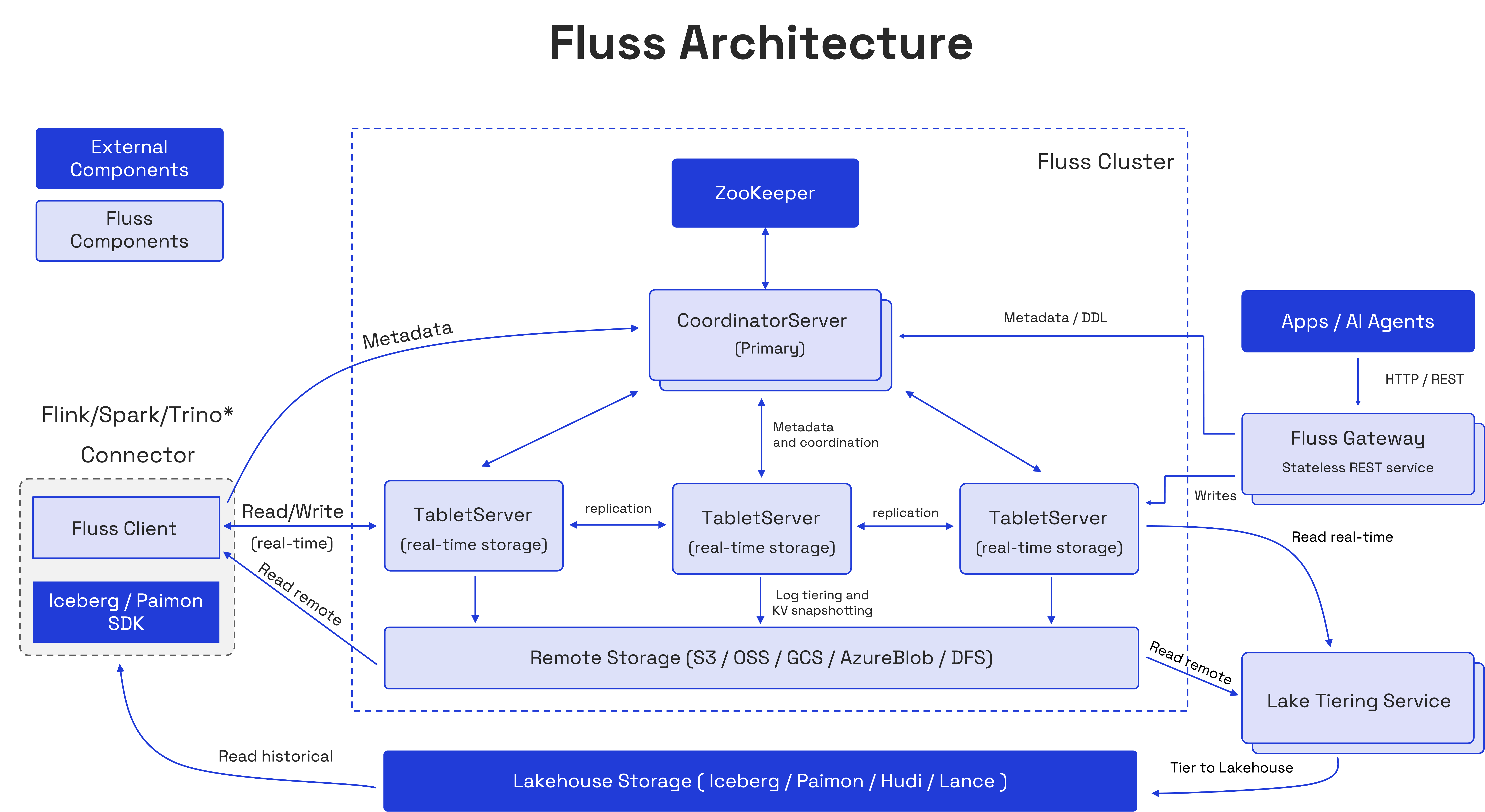
| Component | Responsibility |
|---|---|
| CoordinatorServer | Manages databases, tables, partitions, TabletServer membership, and bucket replica placement and leadership. |
| TabletServer | Hosts bucket replicas, processes reads and writes, replicates logs, and manages local storage and background storage tasks. |
| ZooKeeper | Stores cluster metadata and supports server registration and coordinator leader election. |
| Remote storage | Stores Fluss log segments and key-value snapshots outside individual TabletServers. |
| Clients and connectors | Discover metadata, route requests, and expose table operations to applications and compute engines. |
| Fluss Gateway | Provides a stateless HTTP/REST entry point for metadata, DDL, and schema-aware batch writes, using a native client to access the cluster. |
| Lakehouse tiering service | Runs as a separate Flink job to maintain an open lakehouse representation of enabled tables. |
The coordinator participates in metadata and administrative operations. Once a client has discovered the relevant servers, normal table reads and writes go directly to TabletServers. This separates the volume of data traffic from the coordination workload.
Tables, Partitions, and Buckets
Fluss distributes a table through three related abstractions:
- A table defines a schema, table type, and storage properties.
- A partition, when configured, groups rows by partition column values, such as a date or region. Each partition has its own buckets.
- A bucket is the unit of data distribution, log ordering, and replica assignment. A non-partitioned table has one set of buckets.
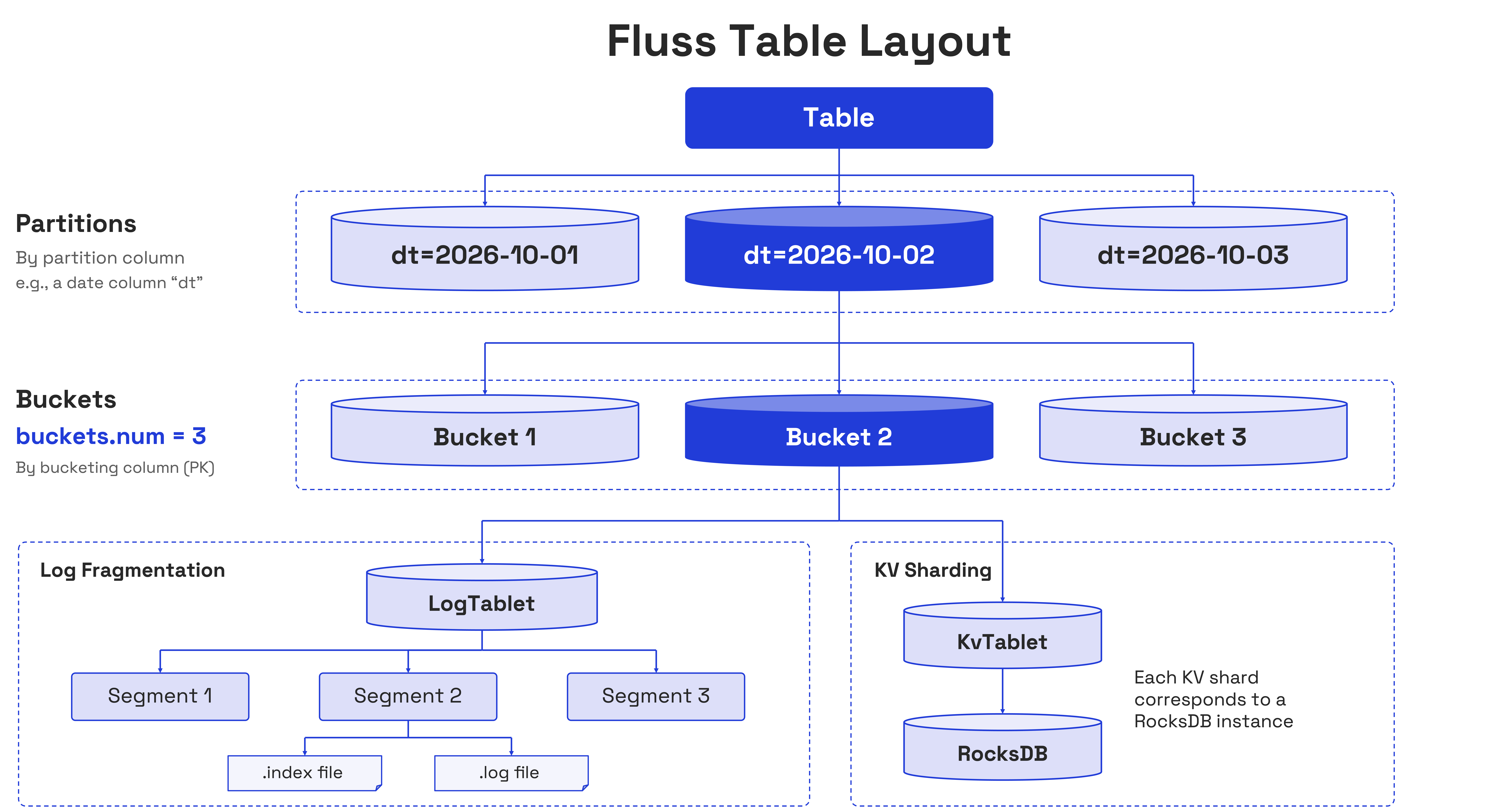
The client selects a bucket using the table's distribution rules. Primary key tables use hash bucketing so operations on the same key reach the same bucket. Log tables can use hash bucketing or distribute records with sticky or round-robin assignment. See Bucketing and Partitioning for configuration and constraints.
Tablet / Bucket
A bucket describes a logical slice of a table; a tablet is its storage representation on a TabletServer. A LogTablet stores the bucket's ordered log. For a primary key table, the bucket leader also maintains a KvTablet containing its key-value state. The leader's LogTablet and KvTablet are hosted together so updates, lookups, and log processing can be coordinated locally.
A bucket's log can have multiple replicas on different TabletServers. Each bucket has a leader, which serves client writes, and follower replicas, which fetch its log. One TabletServer typically hosts replicas for many buckets and can be a leader for some and a follower for others.
Ordering is defined within a bucket. Records in different buckets can be processed concurrently, so applications should not assume a single table-wide order.
CoordinatorServer
The CoordinatorServer manages the cluster's control plane: the metadata and decisions that allow clients and TabletServers to agree on where data belongs.
Its responsibilities include:
- Metadata management: Creating and altering databases, tables, and partitions, and maintaining their schemas and properties.
- Server membership: Tracking available TabletServers and responding to membership changes.
- Replica placement and leadership: Assigning bucket replicas and coordinating leader changes when servers become unavailable.
- Cluster maintenance: Coordinating replica reassignment and rebalancing as servers are added, maintained, or decommissioned.
- Storage coordination: Recording metadata such as completed key-value snapshots and lakehouse tiering progress.
Multiple CoordinatorServer instances can be deployed for high availability. They use ZooKeeper to elect one active coordinator; the other instances remain on standby. When leadership changes, a coordinator epoch identifies the new leader and fences stale coordinator operations.
Coordinator failover temporarily affects administrative operations. Existing data reads and writes can continue against healthy TabletServers, but operations that require new metadata or a placement change depend on the coordinator becoming available. See CoordinatorServer High Availability for deployment instructions.
TabletServer
TabletServers form the data-serving layer. They accept requests for the buckets they host, manage local log and key-value files, replicate logs, and perform background work such as snapshotting and remote log uploads.
The storage components used by a bucket depend on its table type:
| Table type | LogStore | KvStore | Typical access |
|---|---|---|---|
| Log table | Stores appended records. | Not used. | Append events and consume or replay the log. |
| Primary key table | Stores changes used for streaming consumption and state recovery. | Maintains the current row state by primary key. | Upsert or delete rows, look up keys, and consume changes. |
LogStore
LogStore maintains an append-only sequence of records for each bucket. Records have offsets, which identify positions in that bucket's log and allow readers to track progress or resume consumption. The log is organized into segments on local disk, with older segments eligible for upload to remote storage.
For log tables, the log contains the appended data. For primary key tables, it records changes generated by the server as writes are processed. This log also provides the recovery history for the key-value state.
Fluss uses Apache Arrow as its default log format. Columnar record batches support compression and projected reads, allowing compatible clients to request the columns they need. See Log Tables for the storage format, column pruning, and compression options.
KvStore
KvStore maintains a primary key table's current row state using RocksDB. It supports key-based access and applies the table's merge behavior when new records arrive. Depending on the table configuration, writes can replace rows, update selected columns, or use another supported merge engine.
The current state and its change history serve different access patterns: lookups retrieve rows by key, while log readers consume changes over time. The server coordinates updates to these representations so the log can also be used to recover the key-value state.
The active KvTablet is maintained on the bucket leader. Followers replicate the log without maintaining equivalent live KvTablets. Fluss periodically uploads key-value snapshots to remote storage and uses snapshots together with log replay to restore state after a leadership change. This makes snapshot freshness and replay volume relevant to primary key table recovery time.
See Primary Key Tables for merge engines, partial updates, and the change data feed.
Read and Write Paths
Discovery and Routing
A native client starts with configured bootstrap servers, discovers cluster metadata, and resolves the servers responsible for the requested table and buckets. It uses this metadata to route operations and refreshes its view when leadership or server availability changes.
Clients must be able to reach the server addresses advertised by the cluster. A reachable bootstrap endpoint alone is insufficient if the resulting TabletServer addresses are inaccessible from the application's network. See Distributed Deployment for listener configuration.
Writing Data
For a log table, the client selects a bucket, batches records, and sends the append request to the bucket leader. The leader appends the batch to its local log, and followers fetch the new records. Completion depends on the writer's acknowledgment settings.
For a primary key table, the client routes an upsert or delete by key. The bucket leader evaluates the write using the table's merge rules, records the resulting change in the log, and updates the key-value state. The replicated log provides the history needed to reconstruct that state. Acknowledgment is governed by the configured replication requirements; periodic snapshot upload is a separate background operation.
Reading Data
Fluss exposes several access paths with different purposes:
| Access path | Behavior |
|---|---|
| Log scan | Reads a bucket's records from a chosen offset and can continue consuming new records. For primary key tables, this reads the change history. |
| Primary key lookup | Routes a key to its bucket and retrieves the row from the serving key-value state. |
| Snapshot scan | Reads a primary key snapshot through clients that support it, with an associated log position for subsequent change consumption. |
| Remote log read | Retrieves retained log data that has been offloaded from local storage. |
| Union Read | Uses a supported lakehouse integration to read committed lake data together with the relevant Fluss data. |
Log consumers read up to the bucket's high watermark, the boundary of committed log data. This boundary advances with replication progress; for primary key buckets, advancement is also coordinated with key-value state updates. Separate buckets advance independently.
Availability of each access path depends on the client and integration. Consult the Client Support Matrix before choosing an SDK.
Replication and Recovery
Log Replication and Write Durability
Fluss replicates each bucket's log according to the table's replication factor. The leader tracks an in-sync replica set (ISR) containing replicas that meet the replication requirements. Followers that fall behind can leave this set and rejoin after catching up.
Three settings work together to determine write durability and availability:
| Setting | Role |
|---|---|
table.replication.factor | Determines the number of log replicas assigned to a table's buckets. |
client.writer.acks | Determines whether the writer waits for no acknowledgment, the leader, or all in-sync replicas. |
log.replica.min-in-sync-replicas-number | Sets the minimum in-sync replica count required for writes using acks=all. |
With acks=all, a write waits for the in-sync replicas, rather than every configured replica regardless of its health. If the minimum in-sync requirement cannot be met, the write fails. Choosing replication factor, acknowledgment policy, and minimum ISR together is therefore essential; replica count alone does not define the durability of an acknowledged write.
Replicas should also be placed across the failure domains the deployment must tolerate. Copies on different processes offer limited protection if they share the same host or disk failure. See Server Configuration and Rebalancing for the relevant settings and placement controls.
TabletServer Failure
When a TabletServer fails, the coordinator coordinates leadership and replica changes for affected buckets. Clients refresh their metadata and retry eligible operations against the current leader.
For a primary key bucket, the new leader must also prepare its key-value state before serving it. The normal recovery path restores a completed remote snapshot and replays the log from the snapshot's recorded offset. When no snapshot is available, recovery relies on the required log history being available. Snapshot age, retained log volume, and storage bandwidth all influence how long recovery takes.
Lake-backed historical partitions use a separate recovery path based on their lake data and retained changes. See Historical Partition Access for its scope and prerequisites.
ZooKeeper
ZooKeeper is part of the current Fluss deployment architecture. It stores shared metadata and supports coordinator leader election and server registration. Fluss processes use this information to discover membership and coordinate changes consistently.
ZooKeeper holds coordination and metadata state; table records are stored by TabletServers and the configured storage layers. Its availability is nevertheless important for metadata operations and failure recovery. Deploy its ensemble as a shared cluster dependency and configure all Fluss servers to use the same ZooKeeper namespace.
Remote Storage
Remote storage, such as S3, HDFS, or another supported filesystem, extends storage beyond the disks of individual TabletServers. It has two main roles:
- Tiered logs: Fluss asynchronously uploads eligible log segments, allowing historical records to remain accessible after their local copies are removed according to retention policies.
- Key-value snapshots: Fluss stores completed snapshots and their metadata so primary key state can be restored and supported clients can scan snapshots.
Recent log data remains local for low-latency access. Remote log retention, local retention, and snapshot retention have separate purposes and should be configured together with recovery and replay requirements. Asynchronous uploads also mean that remote storage does not replace replication for newly written records.
These files use Fluss's storage representations. Uploading them to an object store does not itself create an Iceberg, Paimon, or other lakehouse table. See Remote Storage and Filesystem Configuration for setup and lifecycle details.
Lakehouse Integration
For tables with lakehouse storage enabled, a separate tiering service runs as a Flink job. It incrementally reads Fluss data, writes the configured open lake format, commits the lake changes, and records the corresponding tiering progress in Fluss.
That progress connects the lake representation to positions in the Fluss log. Compatible readers can use it for Union Read, combining committed lake data with the relevant streaming data. An engine reading the lake table directly sees the committed lake representation, whose freshness depends on tiering progress.
Supported behavior varies by lake format, table type, engine, and execution mode. Shared table metadata does not imply a simultaneous snapshot across every table or engine. See Lakestream Overview, Tiering Service, and Union Read for the integration model and supported access paths.
Client
Applications can access Fluss through native clients, including Java, Rust, Python, and C++, or through compute engine integrations such as Flink and Spark. Clients expose table and administrative operations; the compute engines execute queries, joins, aggregations, and pipelines using those interfaces.
Start with the Java Client, Client Support Matrix, Flink Integration, or Spark Integration for the access method appropriate to your application.
Fluss Gateway
The optional Fluss Gateway is a stateless HTTP/REST service that lets applications and AI agents discover tables, inspect schemas, manage databases and tables, and submit schema-aware batch writes without embedding a native Fluss client. Supported writes include append, upsert, partial update, and delete.
The Gateway uses a native Fluss client internally: metadata and DDL operations go to the CoordinatorServer, while writes are routed to the appropriate TabletServers. It runs separately from CoordinatorServers and TabletServers and keeps no session, cursor, or replay state. Any instance can handle any request, allowing Gateway instances to scale horizontally behind a load balancer independently of the storage cluster.
The 1.0 preview supports HTTP/REST metadata, DDL, and writes; record reads, log scans, and primary-key or prefix lookups require a native client or a supported compute engine integration. See Fluss Gateway for the supported API scope and Deploying Fluss Gateway for deployment and security requirements.
Deployment and Operational Considerations
Architecture choices affect both capacity and recovery:
- Coordinator availability: Run standby coordinators and provide a reliable ZooKeeper ensemble so metadata and placement operations can recover from a process failure.
- TabletServer capacity: Size local disk, memory, CPU, and network bandwidth for the combined workload of client traffic, replication, RocksDB maintenance, snapshots, and remote uploads.
- Bucket distribution: Use enough buckets for the required parallelism and watch for skew. Adding servers increases available capacity, while rebalancing distributes existing replicas across that capacity.
- Scaling boundaries: Moving bucket replicas changes placement. Changing a partitioned table's bucket count applies to future partitions; it does not redistribute existing partitions.
- Storage and recovery: Monitor replica health, snapshot completion, remote uploads, and lakehouse tiering progress. Retention and snapshot policies should support the application's replay and recovery requirements.
For deployment procedures, continue with Distributed Deployment or Kubernetes Deployment. For ongoing operation, use the Rebalancing Guide, Monitoring Guide, and Security Overview.